
In focus
 Logic Pro
The real tools behind the story: Apple’s Session Players and harmonic workflow inside Logic Pro.
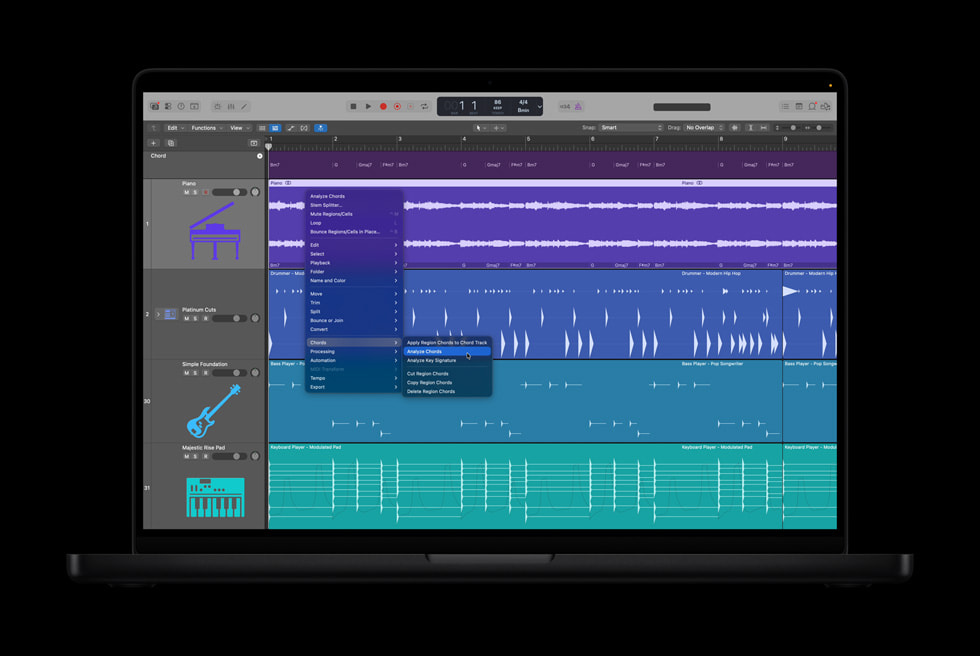
Logic Pro’s Chord ID analyzes audio or MIDI recordings and populates the Chord Track. That harmonic information can then guide Session Players, connecting a recorded idea to an expandable arrangement. Apple ↗
The connection matters: chord detection becomes more useful when other parts of the session can respond to it.
Use the Analysis as a Starting Point
A sensible workflow is to:
- Bring in your own recording.
- Analyze its harmony with Chord ID.
- Listen through and review the suggested progression.
- Audition a supporting Session Player.
- Adjust the arrangement around the original performance.
The review step keeps the musical decisions with you. A detected progression is a proposed interpretation, not a reason to ignore what your ears tell you.
Apple describes the Chord Track as driving Session Player performances, so harmonic analysis can become a starting point for a fuller arrangement. Apple ↗
For producers with folders full of unfinished recordings, the appeal is straightforward: less time reconstructing the idea, more time discovering where it could go.
This article draws on the linked product sources. Creative workflow suggestions are editorial guidance, not a hands-on product test. Features and access can change. Read our editorial approach.