In focus
 Logic Pro
The real tools behind the story: Apple’s Session Players and harmonic workflow inside Logic Pro.
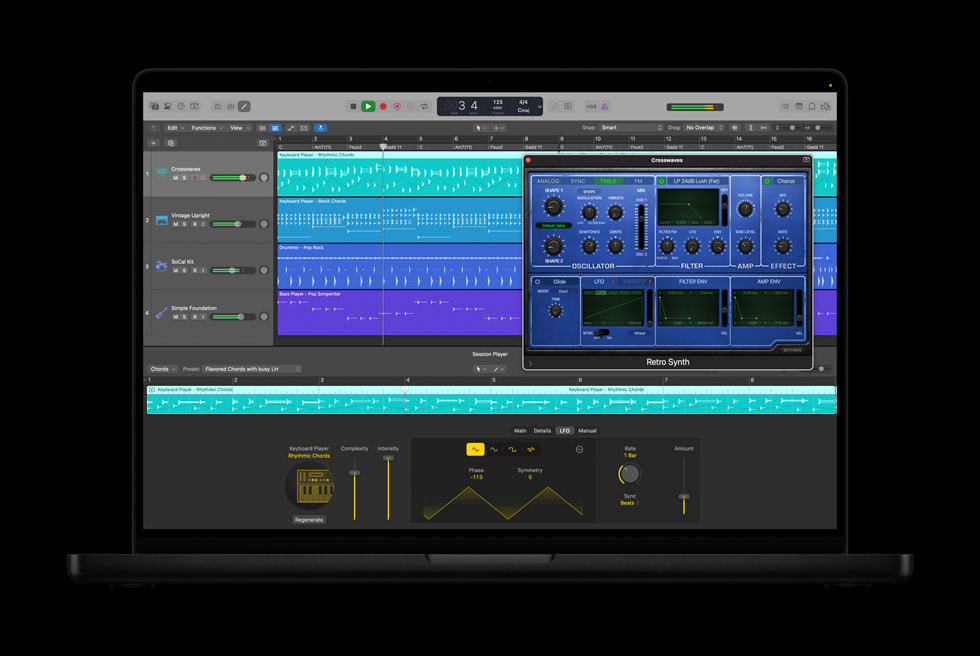
Apple’s Synth Player joins Logic Pro’s AI Session Players with chordal and synth-bass performances. Apple says it responds to controls including complexity and intensity, follows the project’s harmony, and can work with third-party Audio Units instruments or external hardware synthesizers. Apple ↗
That puts the emphasis on collaboration inside the session rather than replacing the session.
Start With Your Musical Identity
Try building around a progression, melody, or recorded performance that already feels personal. Then use a generated synth performance to explore a supporting role: a restrained pad, rhythmic chords, or a contrasting bass movement.
Change one thing at a time. A useful performance can become distracting when its rhythm, sound, and intensity all compete with the lead.
Because Synth Player can address third-party instruments and external synths, the performance and the sound source are not necessarily the same creative decision. You can explore a part first, then choose the instrument that belongs in your track. Apple ↗
The interesting question is not whether an AI part sounds impressive alone. It is whether it makes your song feel more complete.
This article draws on the linked product sources. Creative workflow suggestions are editorial guidance, not a hands-on product test. Features and access can change. Read our editorial approach.